Buying a CTR tool is easy. Proving the clicks actually happened is the hard part. Many platforms sell volume but hand you no evidence that a single visit reached a search result page.
This article sets out the criteria that separate a usable CTR manipulation tool from an expensive guess: visit proof, search surface coverage, device control, targeting, click path and dwell time, and a fair credit model. By the end, you will know how to evaluate CTRTool against each standard and decide whether it fits your campaigns.
What Is CTRTool? Who It Serves and What It Does
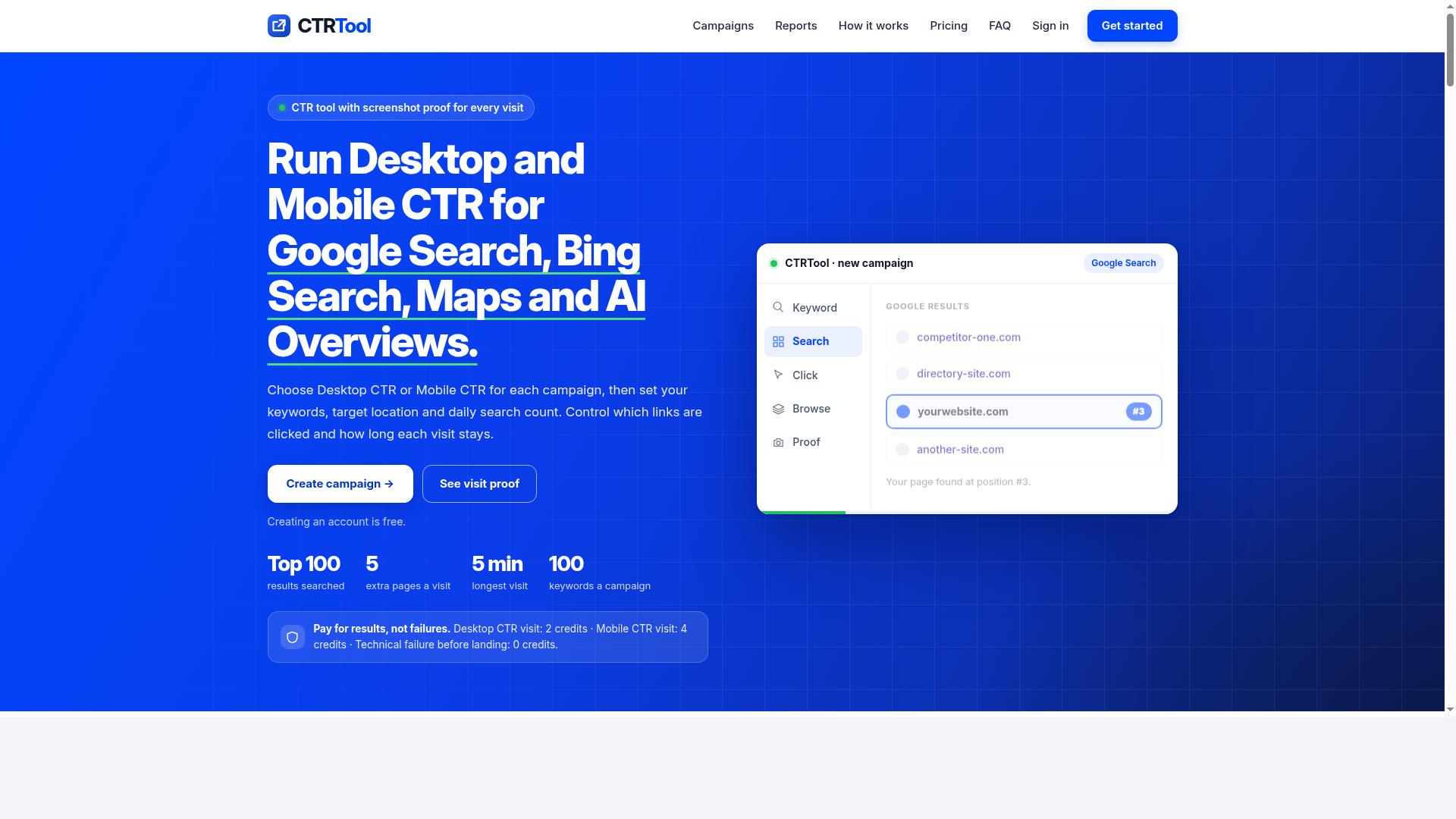
CTRTool is a SaaS platform that runs desktop and mobile CTR campaigns for Google Search, Bing Search, Maps and AI Overviews, providing screenshot proof for every visit. It is a CTR manipulation tool built around one goal: shaping the organic CTR of pages that already rank.
The core function is straightforward. CTRTool simulates user clicks on search results so that user behavior signals tied to a query and a page are influenced over time. Campaigns are configured per surface, with Desktop CTR or Mobile CTR chosen for each one.
The platform serves SEO practitioners and agencies running campaigns for their own sites or for client websites. Within a campaign, users set keywords, target location and daily search count, and control which links are clicked and how long each visit stays.
Two things stand out at this level. First, the four supported surfaces cover classic search plus Maps and AI Overviews, which many tools ignore. Second, screenshot proof for every visit gives practitioners a verifiable record rather than a dashboard number alone.
CTRTool is also candid about limits. The site states plainly that automated visits do not guarantee rankings, a claim worth noting when evaluating any tool in this category.
What to Look for in a CTR Manipulation Tool for Organic CTR
Evaluating a CTR manipulation tool requires checking six practical criteria that separate reliable services from risky click bots. Organic CTR campaigns aim to influence SERP ranking by mimicking genuine user behavior signals, including dwell time, bounce rate and session duration.
Tools that lean on bot traffic, residential proxies, proxy rotation, IP diversity, user agent spoofing, browser fingerprinting, headless browser automation, CAPTCHA bypass or click bots often fail to provide proof of their visits. They may also trigger click fraud detection. The criteria below focus on the checks that expose these gaps.
Proof of Every Visit, Not Just Promises
The first criterion is verifiable proof: demand search and landing screenshots for each visit, not aggregate dashboards or vague reports. A screenshot of the search engine results page shows the query, the clicked result and the position it occupied. A matching landing page capture confirms the visit continued past the click.
Look for three details in that proof:
- Separate captures for the search step and the landing page step, not one combined image
- Timestamps that line up with the scheduled campaign window
- Full visit paths showing the query used, the result clicked and the page that loaded
Tools that only report click counts give you nothing to audit. Without evidence, you cannot tell a genuine visit from bot traffic or a proxy-rotated click farm, and click fraud detection systems on the search side can flag the pattern.
Proof should also cover both Google and Bing results, since campaigns may run on either engine. A concrete example: a campaign targeting "best CRM software" should show the SERP with the clicked result visible and the landing page fully loaded, with a timestamp for each.
Coverage Across Google Search, Bing, Maps and AI Overviews
A capable tool should support campaigns on Google Search, Bing Search, Google Maps and AI Overviews, because search visibility now spans multiple surfaces. Each surface carries a different signal and a different payoff.
- Google Search drives traditional SERP ranking for competitive keywords
- Bing Search diversifies organic traffic and reduces reliance on a single engine
- Google Maps shapes local search visibility for service and storefront businesses
- AI Overviews influence emerging citation order as AI-generated answers absorb more queries
Coverage should include both desktop and mobile results on each surface. A tool limited to one engine leaves gaps in organic traffic and gives an incomplete picture of how user behavior signals accumulate.
AI Overview campaigns need special care. Tracking citation order requires the campaign to match that order, so the tool must record which source was cited and where. Without that matching, you cannot verify whether the campaign influenced the answer or simply ran alongside it. Ask how each surface is verified before committing to any service.
Desktop and Mobile Campaign Control
Device targeting must be explicit: choose Desktop CTR or Mobile CTR per campaign rather than mixing both in one undifferentiated run. Desktop and mobile SERPs differ in layout, ranking and user behavior signals, so a blended campaign obscures which device produced the result.
Verify two things before you rely on a tool:
- You can set device type per campaign, not just once for the whole account
- Results are reported separately for desktop and mobile, with proof attached to each
Mobile click-through rate patterns often diverge from desktop, partly because screen size changes what users see above the fold. Matching device to your target audience matters. A local service may prioritize mobile Maps clicks, since nearby searchers often act on a phone, while a B2B software campaign may lean on desktop Search.
Geo-targeting and country targeting belong in the same conversation. A tool that lets you set device per campaign but ignores location can still send signals from the wrong audience. Ask for both controls together, and check that reporting keeps device and location results distinct so you can judge what actually moved search visibility.
Keyword, Location and Daily Search Targeting
Precise keyword, location and daily search targeting lets you concentrate clicks where they influence the intended SERP ranking. A capable CTR manipulation tool should let you define all three layers before a campaign starts.
Keyword selection should support short head terms, long-tail phrases, and the specific internal page you want to lift. Geo-targeting can narrow to a country, state, or city, or mix several locations, which matters most for local search visibility where results differ block by block.
Daily search volume caps keep activity under a natural ceiling. Without them, sudden spikes in click-through rate can look unnatural and draw scrutiny.
The tool should also confirm the target page appears within the top 100 organic results for the chosen keyword and location. For example, a city-level campaign for "plumber near me" should verify the listing ranks locally before delivering visits.
Click Path and Dwell Time Control
Click path and dwell time control determine whether visits look like genuine user behavior signals or obvious bot traffic. Both settings shape bounce rate and perceived engagement on the search engine results page.
Look for configurable dwell time ranges, the option to visit one or more internal pages, and simulation features such as scroll and mouse movement. These details separate human-like behavior from instant bounces that undercut organic CTR goals.
Short dwell times and single-page sessions are a common weakness. A visitor who lands and leaves in two seconds signals low relevance, which works against the ranking you are trying to support.
A reasonable setting is a 30 to 90 second dwell with one internal page visit, which mimics a user who reads the page and explores further. The tool should let you adjust these values per campaign rather than fixing them.
Fair, Pay-for-Results Credit Model
A fair credit model charges for completed visits with proof, not for attempted clicks or ambiguous bot traffic. Credits should be consumed only when a visit is delivered and documented.
When comparing options, check several points:
- Credit cost per desktop versus mobile visit
- What proof accompanies each delivered visit
- Whether failed attempts consume credits
Subscription models that bill for undelivered clicks deserve caution. You end up paying for bot traffic that never reached the page, which distorts any cost analysis.
Transparent credit pricing helps agencies forecast campaign costs and pass clear figures to clients. Predictable per-visit rates make budgeting simpler than open-ended monthly fees tied to unclear delivery.
How CTRTool Delivers on Each Criterion
CTRTool addresses the six criteria through screenshot proof, multi-surface coverage, device control, targeting options, visit path settings and a credit-based model. Each criterion maps to a specific, verifiable capability rather than a marketing claim.
The tool runs campaigns across Google Search, Bing Search, Maps and AI Overviews, so coverage is not limited to a single search engine results page type. Targeting and device options sit alongside visit path settings, which control how long a session lasts and how many internal pages a visitor opens.
The credit model ties spending to delivered visits. Credits are not charged for technical failures before landing, and visits that cannot verify the requested location use none. The subsections below detail the proof system and the campaign rules that govern eligibility.
Screenshot Proof, Full Visit Paths and Position Tracking
CTRTool provides search and landing screenshots as separate proof images for every visit, along with full visit paths and keyword position tracking over time. This is the core of its positioning as a CTR tool with proof for every visit.
The two screenshots serve different purposes. The search screenshot captures the query and the result clicked, while the landing screenshot confirms the destination page loaded. Timestamps accompany the evidence, so agencies can match a visit to a specific campaign window.
Full visit paths go further by showing internal navigation. Visits can last up to 5 minutes with up to 5 additional internal pages, which gives a record of dwell time and session duration rather than a single page hit.
Position tracking adds a longitudinal layer. Keyword positions are monitored over time, including Maps listing order and AI citation order. For agencies, this evidence supports delivery verification and client reporting without relying on self-reported numbers.
Proof covers both Google and Bing campaigns, so reporting stays consistent across engines.
Campaign Limits, Eligibility Rules and Daily Reset
CTRTool enforces eligibility rules: the target page must appear within the top 100 organic results for the chosen keyword and location before a campaign can run. This prevents wasted credits on pages that cannot realistically receive the intended click.
Maps campaigns follow their own check, reviewing up to 50 listings, which is roughly five pages of results. AI Overview campaigns require a matching source link, since a citation order cannot be tracked without it.
Timing is governed by a daily reset. Daily goals reset at 00:00 UTC, and daily search limits cap how much activity runs within a day. One credit balance is shared across all campaign types, websites and keywords, with support for up to 100 campaigns and 100 keywords per campaign.
Location targeting is flexible. A campaign can target a country, state and city, or any country, and location records come from CountryStateCity via the @countrystatecity/countries 2.0.0 package under the Open Database License 1.0.
Together these rules keep spend tied to eligible, verifiable pages. CTRTool does not guarantee higher rankings, leads or sales.
Pricing and Plans
CTRTool offers monthly plans in USD: Starter at $59 per month for 2,000 credits and Growth at $125 per month for 5,000 credits. Two higher tiers, Scale and Agency, cover larger campaign volumes. Every price is listed in USD and billed monthly, and creating an account is free.
The credit-to-visit ratio is the key to reading these plans. A Desktop CTR visit costs 2 credits, while a Mobile CTR visit costs 4 credits. That is why the same credit pool supports fewer mobile visits.
| Plan | Monthly Price | Credits | Approx. Visit Capacity |
|---|---|---|---|
| Starter | $59 | 2,000 | Up to 1,000 Desktop or 500 Mobile CTR visits |
| Growth (Recommended) | $125 | 5,000 | Up to 2,500 Desktop or 1,250 Mobile visits |
| Scale | $399 | 20,000 | Up to 10,000 Desktop or 5,000 Mobile visits |
| Agency | $699 | 40,000 | Up to 20,000 Desktop or 10,000 Mobile visits |
To choose a plan, estimate your monthly visit target and double it for mobile campaigns. Growth carries a Recommended label and suits campaigns that need steady organic CTR activity across several pages. Starter fits smaller tests.
Unused credits roll over while your subscription stays active, and they expire when cancellation takes effect. CTRTool also notes that prices rise 30% on November 15, so locking in current rates early makes sense.
Who Should Use CTRTool
CTRTool is built for SEO practitioners and agencies running CTR campaigns for their own or client websites across Google Search, Bing Search, Google Maps and AI Overviews. These users share one trait: they need a CTR manipulation tool that delivers measurable, verifiable results rather than vague promises.
Agencies managing multiple client properties benefit most from verifiable proof of delivery. When you report on organic CTR improvements or SERP ranking movement, you need campaign data you can hand to a client. CTRTool's setup supports that accountability.
Common use cases include:
- Supporting behavioral SEO tests to see how user behavior signals affect search visibility
- Improving organic CTR on pages that underperform in the search engine results page
- Tracking Google Maps listing order for local campaigns
The site's guidance mentions tier links, PBNs and test properties, so users should apply these tactics in a compliant, deliberate manner. CTRTool fits professionals who understand the risk profile of behavioral SEO.
It is not for everyone. Those expecting instant ranking guarantees or automated link building should look elsewhere. CTRTool is a campaign tool for informed practitioners, not a shortcut for unrealistic expectations.
Final Verdict
CTRTool earns a qualified recommendation for SEO teams that value proof over promises, provided they accept its eligibility rules and credit-based pricing. Its core strength is accountability: screenshot proof for every visit lets you verify delivery rather than take a dashboard's word for it.
Coverage is broad, spanning Google, Bing, Maps and AI Overviews, with device-specific campaigns and transparent credit pricing. That combination supports a more careful approach to organic CTR work than most tools in this space offer.
Limitations are worth weighing honestly. The top 100 eligibility requirement narrows the pool of usable keywords, no phone support is stated, and compliant use is essential to avoid click fraud risk. None of these are dealbreakers, but they shape who the tool suits.
A sensible first step is the Starter plan to test delivery before committing further. Questions can go to vaibhav@autoblogging.ai, and full details are on the official website at https://ctrtool.com.
Frequently Asked Questions
What should I look for in a CTR manipulation tool's proof of visits?
The strongest tools provide verifiable evidence for every visit rather than just reporting numbers. CTRTool includes screenshot proof for every visit, with search and landing screenshots delivered as separate proof images, plus full visit paths so you can audit exactly what happened. This makes it far easier to confirm that campaigns are actually executing as configured.
Does the tool support both desktop and mobile CTR campaigns?
Yes - device targeting matters because desktop and mobile search results behave differently. CTRTool lets you choose Desktop CTR or Mobile CTR per campaign, and this applies across its campaign types for Google Search, Bing Search, Maps and AI Overviews. Credits are consumed differently by device type, so check your plan's visit allowances before scaling.
Which search platforms and surfaces can a CTR campaign target?
Look for coverage of the surfaces that matter to your rankings, not just classic web search. CTRTool runs campaigns for Google Search, Bing Search, Google Maps and AI Overviews, letting you set keywords and target a chosen country with an optional state and city, or "Any country" for a mix of supported locations. For Maps campaigns, the tool checks up to 50 listings (about five pages), and AI Overview campaigns require a matching source link.
How much does a CTR manipulation tool cost, and how are credits used?
Pricing should be transparent and tied to measurable results. CTRTool uses monthly USD plans with pay-for-results credits - for example, Starter is $59/month for 2,000 credits (up to 1,000 Desktop CTR visits or 500 Mobile CTR visits), and Growth is $125/month for 5,000 credits (up to 2,500 Desktop or 1,250 Mobile visits). Because mobile visits consume more credits, estimate your device mix before choosing a plan.
Can I track keyword positions over time, including Maps and AI Overviews?
Position tracking is essential for judging whether a campaign is working. CTRTool tracks keyword positions over time, including Maps listing order and AI citation order, so you can see movement across surfaces rather than a single snapshot. Note that the page must appear within the top 100 organic results for the chosen keyword and location for campaigns to run.
What support and legal information should I expect from a CTR tool?
Check that the provider publishes clear terms and a real support channel before committing. CTRTool lists Support, Terms of use and Legal notices pages on its site, with support available via vaibhav@autoblogging.ai. Reviewing these pages first helps you confirm the tool fits your workflow and compliance expectations.